Virus Killer2.3
Publisher Description
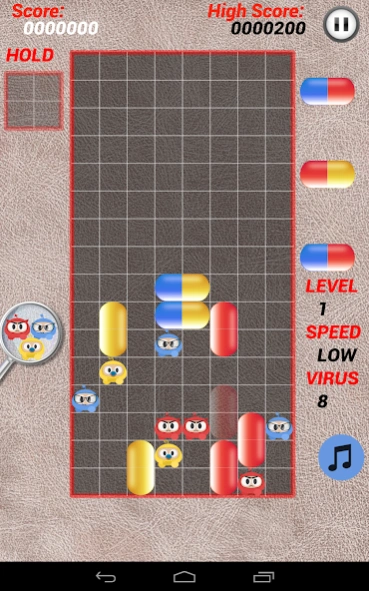


kill all the viruses with capsules of the same color.
The board is populated by viruses of three colors: red, yellow, and blue, the player manipulates each capsule as it falls, moving it left or right and rotating it such that it is positioned alongside the viruses and any existing capsules. When four or more capsule halves or viruses of matching color are aligned in vertical or horizontal configurations, they are removed from play. The main objective is to complete levels, which is accomplished by eliminating all viruses from the playing field. A game over occurs if capsules fill up the playing field in a way that obstructs the bottle's narrow neck.
Players can select the degree of starting difficulty any time a new game is started. The initial level chosen is a value between zero and twenty that determines the number of viruses to clear, and the three game speed options change how fast the capsules fall in the bottle. The player's score is based solely on the elimination of viruses, not on the time taken to complete the level or the number of capsules used. If players complete the highest difficulty level, they can continue playing to accumulate a higher score, but the number of viruses to clear remains the same. Additional points are awarded when multiple viruses are eliminated at once, but no additional points are awarded for initiating chain reactions, in which the elimination of one set of objects triggers the elimination of another set. The game speed is also a factor in how the game calculates scoring; higher speed levels yield more points.
About Virus Killer
The company that develops Virus Killer is YI ZHENG. The latest version released by its developer is 2.3. This app was rated by 2 users of our site and has an average rating of 3.0.
To install Virus Killer on your Android device, just click the green Continue To App button above to start the installation process. The app is listed on our website since 2026-09-13 and was downloaded 24 times. We have already checked if the download link is safe, however for your own protection we recommend that you scan the downloaded app with your antivirus. Your antivirus may detect the Virus Killer as malware as malware if the download link to com.xraystudiogame.dr is broken.
How to install Virus Killer on your Android device:
- Click on the Continue To App button on our website. This will redirect you to Google Play.
- Once the Virus Killer is shown in the Google Play listing of your Android device, you can start its download and installation. Tap on the Install button located below the search bar and to the right of the app icon.
- A pop-up window with the permissions required by Virus Killer will be shown. Click on Accept to continue the process.
- Virus Killer will be downloaded onto your device, displaying a progress. Once the download completes, the installation will start and you'll get a notification after the installation is finished.
Program Details
System requirements
Download information
Pricing
Version History
version 2.3
posted on 2026-09-13
improve compatibility
version 2.2
posted on 2025-12-23
Hide control buttons when gesture control is enabled.
Change background to the classic theme
version 2.1
posted on 2025-12-05
fix bug
version 1.8
posted on 2024-10-04
version 1.7
posted on 2023-12-17
update for the new Android system
version 1.5
posted on 2020-04-23
new background
new music
improve controller button
version 1.3
posted on 2019-10-28
Enable Gesture Control by default since many users prefer it.
version 1.3
posted on 2019-10-24
Watch a video to Revive on game over!
version 1.3
posted on 2019-08-25
Add buttons to control the game, the gesture control is disabled by default.
Two optional button control modes:
1.Continuous Move:
Keep the button down, the pill will move Continuously
2.Step Move:
press and release the button to move the pill by one step
version 1.1.0
posted on 2018-10-16
update to the latest API and add privacy policy
